SD Agent
Status: Planning
Priority: Medium
Vote with 👍 on GitHub Issue #272
Overview
An AI agent that helps users generate better Stable Diffusion images through intelligent optimization of both prompts and generation parameters. The agent analyzes user intent, enhances text descriptions, and recommends optimal settings (model, size, steps, cfg_scale) for high-quality results. Triple Optimization Approach:- Prompt Enhancement: Transform simple text (“a cat”) into detailed, effective SD prompts
- Parameter Optimization: Recommend model selection, dimensions, inference steps, and guidance scale
- VLM-Powered Iteration: Analyze generated images with Vision LLM, score quality across categories, and automatically iterate until quality threshold is met
- LLM-powered prompt analysis and enhancement (AMD NPU-accelerated)
- Intelligent parameter recommendation (model, size, steps, cfg_scale)
- VLM-powered image evaluation (composition, lighting, prompt adherence, style, technical quality)
- Autonomous iteration loop - generate → evaluate → refine → regenerate until quality threshold met
- Template library with proven patterns
- A/B testing and strategy comparison
- Terminal image display for immediate visual feedback
- SQLite database for generation history
- Agent-powered search and filtering (natural language queries)
- Web gallery UI with task-based interface for browsing, annotating, and rating
- Version control and reproducibility
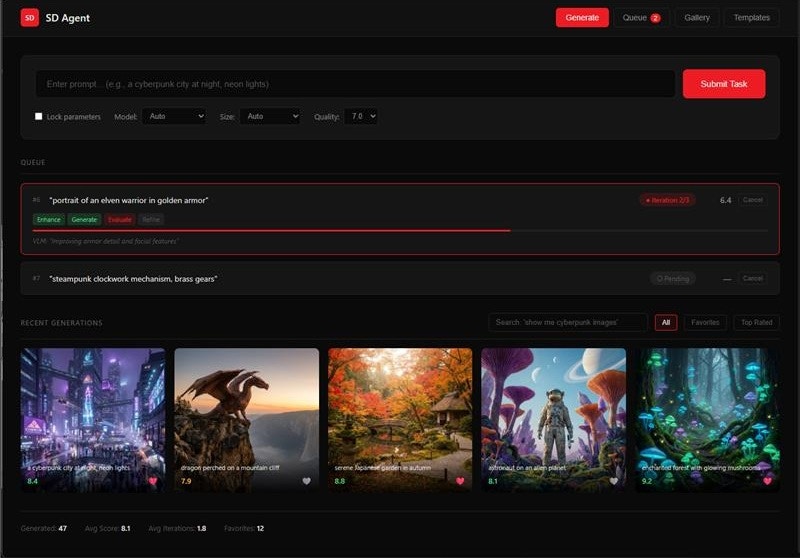
View the interactive mockup for a full preview of the gallery UI.
System Architecture
High-Level Overview
Data Flow
Generation Workflow (with VLM Iteration Loop):- User Request → CLI/Task Interface submits generation task
- Prompt Enhancement → Agent sends original prompt to LLM
- Parameter Optimization → Agent recommends SD parameters based on prompt + user preferences
- Image Generation → Agent calls Lemonade SD endpoint
- VLM Evaluation → Image Evaluator analyzes output using Qwen3-VL-4B
- Scores across categories: composition, lighting, prompt adherence, style consistency, technical quality
- Returns overall score (1-10) + category breakdown + improvement suggestions
- Iteration Decision → If score < threshold (default 7/10) AND iterations < max:
- VLM feedback refines prompt and/or parameters
- Return to step 4 (regenerate with improvements)
- Storage → Agent saves final image + all iterations to SQLite + file system
- Display → Final image shown in terminal or Gallery UI with quality report
- Learning → Successful patterns stored for future preference learning
- User Query (natural language) → “show me all cyberpunk cities”
- LLM Translation → Agent converts to SQL query
- Database Query → Execute against SQLite
- Results → Return matching generations with images
- Image Input → Generated image passed to VLM (Qwen3-VL-4B)
- Multi-Category Scoring → VLM evaluates:
- Composition (1-10): Rule of thirds, balance, focal point
- Lighting (1-10): Consistency, mood, shadows/highlights
- Prompt Adherence (1-10): How well image matches the prompt
- Style Consistency (1-10): Coherent artistic style throughout
- Technical Quality (1-10): Sharpness, artifacts, resolution
- Overall Score → Weighted average of categories
- Improvement Suggestions → VLM provides specific feedback for refinement
- Iteration Trigger → If below threshold, suggestions feed back into enhancement loop
- User Rates Images → 1-5 stars stored in database
- Pattern Analysis → Agent analyzes high-rated generations
- Preference Learning → Identify preferred styles, models, parameters
- Future Enhancements → Bias recommendations toward learned preferences
Technical Decisions
| Decision | Choice | Rationale |
|---|---|---|
| Optimization Engine | Qwen3-4B-Instruct-2507-FLM (AMD NPU) | Fast, efficient prompt enhancement optimized for NPU |
| Image Evaluator | Qwen3-VL-4B (AMD NPU) | VLM-powered quality scoring and iteration feedback |
| Evaluation Categories | Composition, lighting, prompt adherence, style, technical | Comprehensive quality assessment across key dimensions |
| Iteration Strategy | Auto-iterate until score ≥ 7/10 or max 3 iterations | Balance quality improvement with generation time |
| Focus Domain | Stable Diffusion only (via Lemonade Server) | Deep specialization, measurable quality improvement |
| Optimization Scope | Prompts + parameters + VLM feedback loop | Holistic optimization with automated quality assurance |
| SD Backend | Lemonade Server /api/v1/images/generations | AMD NPU/GPU optimized, local inference, privacy |
| Supported Models | SD-Turbo, SDXL-Turbo | Fast inference on AMD hardware |
| Parameters Optimized | model, size, steps, cfg_scale, seed | All tunable SD generation parameters |
| Template Library | SD-specific patterns (photorealistic, anime, etc.) | Codify proven prompt+parameter combinations |
| Storage | SQLite database + file system | DatabaseMixin, queryable history, fast retrieval |
| Database Schema | generations, templates, prompt_versions, evaluations | Structured storage for all generation + evaluation data |
| Image Files | .gaia/cache/sd/images/ | Internal cache for generated images (not user-facing) |
| Output Formats | PNG (default), JPEG | PNG for quality, JPEG for smaller file size |
| Image Download | Explicit download to ~/Downloads | Gallery download button exports to user’s Downloads folder |
| Gallery UI | Task-based web interface (Electron or browser) | Submit tasks → view results, browse, annotate, rate, download |
| Terminal Display | rich + term-image | CLI image preview |
| Metadata Format | Database rows + JSON export | Queryable + portable |
Architecture
Component Structure
Database Schema
Class Hierarchy
User Experience
Mode 1: Prompt Enhancement Only
Use Case: Optimize prompts before generatingMode 2: Full Generation Pipeline
Use Case: Generate with automatic quality iterationMode 3: Task Queue
Use Case: Batch processing with autonomous executionMode 4: Strategy Comparison
Use Case: A/B test different styles with VLM scoringMode 5: Download Images
Use Case: Export images from gallery to Downloads folderCore Features
1. LLM-Powered Prompt Enhancement Engine
Problem: Users struggle to write effective prompts that produce desired results from AI systems (SD, LLMs, etc.). Prompt engineering is a specialized skill. Solution: Use GAIA’s AMD NPU-accelerated LLM to analyze user intent and generate optimized prompts using domain-specific best practices. Core Capabilities:A) Intent Analysis
B) Domain-Specific Enhancement
| Domain | Enhancement Focus | Example |
|---|---|---|
| Stable Diffusion | Style, lighting, composition, quality keywords | ”mountain” → “serene mountain landscape, golden hour…” |
| LLM Prompts | Clarity, context, examples, constraints | ”write code” → “Write Python code that… Use type hints…” |
| Code Generation | Specificity, patterns, requirements, constraints | ”make API” → “Create FastAPI endpoint with Pydantic models…” |
--auto(default): Fully automated enhancement--suggest: Show suggestions, let user pick--interactive: Collaborative refinement--no-enhance: Use prompt as-is--style <style>: Force specific artistic style
2. Prompt Quality Scoring & Analysis
Goal: Provide objective feedback on prompt quality before generation. Scoring Criteria (for Stable Diffusion):| Criterion | Weight | Checks |
|---|---|---|
| Clarity | 20% | Clear subject, unambiguous intent |
| Style | 20% | Artistic style specified (photorealistic, anime, etc.) |
| Details | 20% | Specific details (colors, textures, objects) |
| Technical | 15% | Lighting, composition, camera angle |
| Quality | 15% | Quality keywords (4k, detailed, high quality) |
| Length | 10% | Optimal token count (10-50 tokens) |
3. Terminal Image Display & Verification
Goal: Provide immediate visual feedback on prompt quality by generating test images in-terminal. Use Case: After enhancing a prompt, quickly verify it produces desired results without leaving the CLI. Terminal Support:| Terminal | Protocol | Library | Windows | Linux | macOS |
|---|---|---|---|---|---|
| Windows Terminal | Sixel | term-image | ✅ | - | - |
| iTerm2 | Inline Images | imgcat | - | - | ✅ |
| Kitty | Graphics Protocol | term-image | ✅ | ✅ | ✅ |
| Standard terminals | ASCII art | term-image | ✅ | ✅ | ✅ |
- Try native terminal image protocol
- Fall back to Unicode block art (better than ASCII)
- Finally, open image in default viewer
4. Prompt Template Library
Goal: Codify and reuse successful prompt patterns. Template Structure:| Category | Templates | Use Cases |
|---|---|---|
| Photography | portrait, landscape, macro, street, architectural | Photorealistic scene composition |
| Artistic | oil-painting, watercolor, anime, comic-book, sketch | Artistic style applications |
| Mood | dramatic, serene, energetic, mysterious, playful | Emotional atmosphere |
| Genre | cyberpunk, fantasy, sci-fi, horror, vintage | Genre-specific aesthetics |
| Technical | product-shot, technical-diagram, infographic | Professional/commercial use |
5. Iterative Refinement Workflow
Goal: Progressively improve prompts through multiple enhancement cycles. Workflow:6. Prompt Comparison & A/B Testing
Goal: Empirically determine which prompt strategies work best.7. Prompt Version Control & History
Goal: Track prompt evolution and enable rollback. Version Structure:8. Image Storage & Verification Cache
Cache Structure:- Reproducible generations (same seed = same image)
- Easy prompt history tracking
- Performance benchmarking data
- Version control friendly (JSON diff)
9. Prompt Testing with Visual Variations
Goal: Test prompt robustness by generating multiple images with different seeds. Use Case: A good prompt should produce consistently good results across different seeds.Agent Implementation
PromptAgent Class
System Prompt
CLI Integration
Command Structure
Command Handlers
Lemonade Client Extension
Add Image Generation Method
Dependencies
New Libraries Required
Optional Dependencies
Pillow: For image manipulation, format conversionterm-image: Cross-platform terminal image rendering (supports sixel, iTerm2, Kitty)- Both are lightweight and well-maintained
Testing Strategy
Unit Tests
Integration Tests
CLI Tests
Documentation Requirements
User Guide
Createdocs/guides/image.mdx:
- Getting started with image generation
- Prompt writing best practices
- Model selection guide
- Parameter tuning tips
- Examples gallery
SDK Reference
Createdocs/sdk/agents/image-agent.mdx:
ImageAgentAPI reference- Tool specifications
- Code examples for programmatic use
CLI Reference
Updatedocs/reference/cli.mdx:
- Add
gaia imagecommand documentation - All flags and options
- Usage examples
Implementation Plan
Phased Approach: Terminal CLI → Web Gallery UIPhase 1: Core Optimization Engine (Week 1)
Goal: SD prompt enhancement + parameter optimization working in CLI- Create
SDAgentclass skeleton (Agent + DatabaseMixin) - Initialize SQLite database with schema (generations, templates, prompt_versions, evaluations, task_queue)
- Implement
PromptEnhancerclass with LLM backend (AMD NPU) - Implement
PromptAnalyzerclass for quality scoring (1-10) - Implement
ParamOptimizerclass for SD parameter recommendations - Add
analyze_prompttool - Add
enhance_prompttool - Add
optimize_parameterstool (model, size, steps, cfg_scale) - Add basic CLI commands (
gaia sd analyze,gaia sd enhance) - Unit tests for enhancer, analyzer, and optimizer
gaia sd enhance "a mountain" produces enhanced prompt + recommended parameters with quality score
Phase 2: Image Generation + VLM Evaluation (Week 2)
Goal: Full generation pipeline with VLM-powered quality iteration- Extend
LemonadeClientwithgenerate_image()method - Create
ImageGeneratorwrapper class - Implement
ImageEvaluatorclass (VLM-powered using Qwen3-VL-4B)- Score across 5 categories: composition, lighting, prompt adherence, style, technical
- Return overall score + improvement suggestions
- Implement
IterationController(generate → evaluate → refine loop)- Configurable quality threshold (default 7/10)
- Max iterations limit (default 3)
- Tracks all iterations in database
- Implement
generate_imagetool (full pipeline: enhance → optimize → generate → evaluate → iterate) - Add
evaluate_imageanditerate_until_qualitytools - Save all generations + evaluations to database
- Implement image file storage (
.gaia/cache/sd/images/) - Create
TerminalDisplayclass for in-terminal image preview- Sixel support (Windows Terminal)
- iTerm2/Kitty support
- Fallback to external viewer
- Add
gaia sd generatecommand (with--quality-thresholdand--max-iterationsflags) - Add
gaia sd historycommand (list recent generations from DB) - Integration tests with Lemonade Server (LLM + VLM + SD)
gaia sd generate "mountain" enhances, generates, evaluates with VLM, iterates if needed, displays final result with quality report
Phase 3: Templates & Search (Week 3)
Goal: Template library and natural language search- Implement
TemplateLibraryclass (DB-backed) - Build starter template set (10+ templates) with prompt+parameter combos
- Photography styles (portrait, landscape, macro)
- Artistic styles (photorealistic, anime, oil-painting, watercolor)
- Genre templates (cyberpunk, fantasy, sci-fi, horror)
- Add template tools:
list_templates,use_template,save_as_template - Implement natural language search tools:
search_generations(e.g., “show me all cyberpunk images”)filter_by_params(e.g., “find images generated with SDXL-Turbo”)get_favorites,get_top_rated
- Add CLI commands:
gaia sd templates,gaia sd use,gaia sd search - LLM-powered query translation (natural language → SQL)
- Unit tests
Phase 4: Gallery UI with Task Interface (Week 4)
Goal: Standalone web UI for task-based image creation and gallery management UI Components:- Gallery Server (Flask/FastAPI)
- REST API for CRUD operations on generations
- WebSocket for real-time generation progress updates
- Static file serving for images
- Task Submission Interface
- Natural language input: “a cyberpunk city at night, neon lights”
- Optional parameter locks: hardwire model, size, steps, seed (override agent recommendations)
- Submit task → agent processes autonomously → returns result
- Live progress indicator (enhancing → generating → evaluating → iterating)
- Quality score display with category breakdown
- Iteration history (show all attempts if multiple iterations)
- Gallery View
- Grid/list view of all generations
- Filter controls (model, size, date range, rating)
- Natural language search box
- Sort by date, rating, favorites
- Image Detail View
- Full-size image display
- Prompt and parameters display
- Rating system (1-5 stars)
- Notes/annotations text area
- Tags editor
- Favorite toggle
- Actions: regenerate, refine, save as template
- Task Queue System
- Implement
TaskQueueclass with SQLite persistence - Submit multiple tasks to queue (natural language + optional parameter locks)
- Agent processes tasks sequentially (or parallel if resources allow)
- Queue status display (pending, in-progress, completed, failed)
- Priority ordering (urgent tasks jump queue)
- Cancel/pause/resume individual tasks
- Batch submission (“generate 5 variations of this prompt”)
- WebSocket notifications when tasks complete
- Implement
- Reference-Based Generation
- Agent can retrieve top-rated images
- Use high-rated prompts/parameters as inspiration
- “Generate something similar to my favorite landscapes”
- Template Browser
- Browse available templates
- Preview example images
- Quick-apply to new generation
- Backend: FastAPI + SQLite (via DatabaseMixin)
- Task Queue: In-memory queue with SQLite persistence for recovery
- Frontend: React/Vue + Tailwind CSS
- Communication: REST API + WebSockets for live updates
- Packaging: Electron wrapper for desktop app
http://localhost:5000 with task-based image creation, queue management, and searchable gallery
Phase 5: Advanced Features & Polish (Week 5)
Goal: Production-ready with full feature set CLI Enhancements:- Interactive mode (
gaia sdwith no args → task submission interface) - Comparison mode (
gaia sd compare "dragon" --strategies photorealistic,anime) - Batch generation (
gaia sd batch "prompt" --count 10 --vary-params) - Queue management (
gaia sd queue status,gaia sd queue cancel <id>) - Export tools (JSON, CSV, ZIP with images)
- Keyboard shortcuts
- Bulk operations (tag multiple, export selection, delete)
- Advanced filters (tag combinations, parameter ranges)
- Gallery statistics (total images, by model, avg rating)
- Settings page (default parameters, UI preferences)
- Performance optimization (query caching, lazy loading)
- Error handling and user-friendly messages
- Loading states and progress indicators
- Image thumbnails for faster gallery loading
- Database optimization (indexes, cleanup old entries)
- User guide (
docs/guides/sd-agent.mdx) - SDK reference (
docs/sdk/agents/sd-agent.mdx) - Update CLI reference (
docs/reference/cli.mdx) - Gallery UI guide
- Prompt engineering best practices
- Example gallery showcase
- Full test coverage (unit, integration, E2E)
- Performance benchmarks
- UI testing (Playwright/Cypress)
Future Enhancements
Advanced Prompt Engineering Features
-
Multi-Domain Expansion
- LLM Prompts: Chain-of-thought, few-shot, role-playing optimization
- Code Generation: Language-specific patterns, framework templates
- Vision Models: VLM-specific prompt engineering (Qwen2-VL, etc.)
- Audio Models: TTS/ASR prompt optimization (Whisper, Kokoro)
-
Collaborative Prompt Engineering
- Team Templates: Shared prompt libraries across organization
- Version Control Integration: Git-style branching for prompts
- Feedback Loop: Track which prompts perform best over time
- Prompt Marketplace: Share/discover templates from community
-
Advanced Analysis
- Semantic Similarity: Find similar successful prompts
- Performance Tracking: Which styles/keywords correlate with quality
- Automated A/B Testing: Run overnight experiments
- CLIP Score Integration: Objective image-prompt alignment scoring
-
MCP Integration
- Expose prompt enhancement as MCP tool
- Integration with VSCode, Claude Desktop, etc.
- Real-time prompt suggestions in external editors
Image Generation Enhancements
-
Advanced SD Features
- Negative Prompts: Specify what NOT to include
- Prompt Weights: Control emphasis on different elements
- ControlNet Support: Pose, depth, edge guidance
- LoRA Integration: Custom model fine-tuning
- Image-to-Image: Style transfer, variations from reference
- Inpainting/Outpainting: Edit specific regions
-
Multi-Model Support
- Support for multiple SD checkpoints
- FLUX, Midjourney-style prompts
- Cross-model prompt translation
- Model recommendation based on use case
-
Batch Operations
- Grid Search: Systematically test parameter combinations
- Style Exploration: Generate matrix of style variations
- Parameter Optimization: Find best steps/cfg_scale for prompt
- Scheduled Generation: Queue overnight batch jobs
Integration & Collaboration
-
Agent Ecosystem Integration
- PromptAgent + BlenderAgent: Generate texture prompts for 3D scenes
- PromptAgent + CodeAgent: Generate documentation with illustrations
- PromptAgent + ChatAgent: Enhance chat responses with visuals
- PromptAgent + JiraAgent: Create visual mockups from issue descriptions
-
UI/UX Enhancements
- Web UI: Browser-based prompt engineering workspace
- Electron App: Desktop app with drag-drop, galleries
- Mobile Companion: Review generations, rate prompts on mobile
- Browser Extension: Enhance prompts for SD web UIs (AUTOMATIC1111, ComfyUI)
-
Export & Publishing
- Prompt Cards: Beautiful shareable images of prompt+result
- Portfolio Export: Generate HTML galleries
- API Access: Programmatic prompt enhancement API
- Webhook Integration: Notify on completion, feed to other systems
Research & Experimental Features
-
LLM-as-Judge
- Use LLM to rate generated images
- Automated quality assessment
- Suggest prompt improvements based on output
-
Reinforcement Learning
- Learn from user preferences over time
- Personalized prompt enhancement
- Adapt to individual artistic style
-
Cross-Modal Prompt Engineering
- Text → Image → Text (caption generated images)
- Video prompts (SD animation)
- 3D prompt engineering (for 3D generative models)
-
Educational Features
- Prompt Engineering Tutor: Interactive lessons
- Challenge Mode: Daily prompt challenges
- Skill Progression: Track improvement over time
Success Metrics
Performance Targets
| Metric | Target | Rationale |
|---|---|---|
| Prompt Analysis | < 500ms | Near-instant feedback |
| Prompt Enhancement | < 1s | LLM inference on AMD NPU |
| Image Generation (512x512) | < 3s | AMD NPU acceleration |
| Image Generation (1024x1024) | < 8s | SDXL on NPU |
| Terminal Display | < 500ms | Instant visual feedback |
| Template Application | < 100ms | Cache lookup |
| A/B Comparison (4 strategies) | < 5s analysis + image time | Parallel enhancement |
Quality Metrics
| Metric | Target | Measurement Method |
|---|---|---|
| Enhancement Accuracy | 90%+ user satisfaction | User ratings on enhanced prompts |
| Score Correlation | 85%+ correlation with actual quality | Compare scores vs. user ratings |
| Token Efficiency | Average enhanced prompt 15-40 tokens | CLIP token limit optimization |
| Quality Improvement | +6 points average (3 → 9/10) | Before/after scoring |
| CLIP Score Improvement | +15% on generated images | Automated CLIP scoring |
| Template Success Rate | 95%+ successful applications | Error-free template application |
User Experience Goals
| Goal | Target | Measurement |
|---|---|---|
| Zero-config | Works immediately after install | No setup steps required |
| Fast Workflow | Analyze → enhance → verify in < 5s | End-to-end timing |
| No Context Switching | Everything in terminal | No external apps needed |
| Discoverability | 80%+ find features without docs | CLI help clarity |
| Reproducibility | Same prompt + seed = same result | Deterministic generation |
| Learning Curve | First success in < 2 minutes | Time to first enhanced prompt |
Adoption Metrics
| Metric | 1 Month | 3 Months | 6 Months |
|---|---|---|---|
| Active Users | 100+ | 500+ | 1000+ |
| Prompts Enhanced | 1000+ | 10k+ | 50k+ |
| Templates Created | 50+ | 200+ | 500+ |
| Average Quality Improvement | +5 points | +6 points | +7 points |
| User Satisfaction | 80%+ | 85%+ | 90%+ |
Open Questions
Technical Decisions Needed
-
Prompt Enhancement Philosophy:
- How aggressive should auto-enhancement be?
- Always show before/after diff, or hide unless
--show-enhancement? - Should enhancement preserve exact user phrasing or fully rewrite?
- Support for multiple enhancement styles (conservative, creative, etc.)?
-
Scoring Algorithm:
- Use LLM-as-judge or rule-based scoring?
- How to weigh different criteria (clarity vs. detail vs. style)?
- Should scores be domain-specific or universal?
- Calibrate scores against human ratings?
-
Template System Design:
- JSON vs. Jinja2 templates vs. custom DSL?
- How much flexibility vs. simplicity?
- Support for nested/composed templates?
- Template versioning and updates?
-
Cache Management:
- Max cache size before cleanup warnings?
- LRU eviction vs. user-controlled deletion?
- Compress old metadata or keep full history?
- Export/import cache across machines?
-
SD Integration Scope:
- Support only Lemonade Server or also AUTOMATIC1111, ComfyUI?
- Implement image-to-image or MVP text-to-image only?
- Support for custom checkpoints/LoRAs?
-
AMD Hardware Optimization:
- Auto-detect NPU and adjust LLM model selection?
- Warn if running on CPU-only?
- Benchmark mode to showcase AMD performance?
Product Decisions
-
Target Audience Priority:
- Beginners (teach prompt engineering) or experts (power tools)?
- Both? How to balance?
-
Domain Expansion:
- Launch with SD-only or include LLM/code from start?
- Which domain after SD? (LLM, code, VLM, audio?)
-
UI Strategy:
- CLI-only MVP or invest in web UI early?
- Electron app before or after web UI?
- Terminal UI (TUI) with rich interactive widgets?
-
Community Features:
- Public template marketplace?
- Share prompts anonymously or with attribution?
- Rating/review system for templates?
- Moderation approach?
-
Integration Priority:
- Which GAIA agent integration first?
- BlenderAgent (texture prompts)
- ChatAgent (illustrated responses)
- CodeAgent (UI mockups)
- External integration (VSCode, Claude Desktop, etc.)?
- Which GAIA agent integration first?
-
Monetization/Sustainability:
- Open source all features or premium tier?
- Cloud service for prompt analysis (privacy concerns)?
- Commercial template packs?
-
Documentation Approach:
- Auto-generate templates from successful prompts?
- Interactive tutorials vs. static docs?
- Video content priority?
References
External Documentation
Prompt Engineering:- OpenAI Prompt Engineering Guide
- Anthropic Prompt Library
- Learn Prompting - Comprehensive prompt engineering course
Internal GAIA Specs
Core Framework: Related Agents:- ChatAgent - Conversation patterns
- BlenderAgent - 3D content generation
- Routing Agent - Agent selection logic
Academic & Research
- CLIP: Learning Transferable Visual Models
- Prompt Engineering for Large Language Models: A Survey
- Visual Instruction Tuning
Similar Implementations
Within GAIA:- BlenderAgent: Domain-specific tool enhancement (3D scene generation)
- SummarizerAgent: Multi-file processing, caching patterns
- ChatAgent: Conversational refinement, RAG integration
- RoutingAgent: Agent selection based on analysis
- Midjourney:
/imaginecommand with prompt engineering - DALL-E: Prompt suggestions and variations
- ChatGPT: System prompts and role optimization
Approval Checklist
Planning & Scope
- Problem statement clear (prompt engineering accessibility)
- User experience defined (multiple workflows)
- Primary use case identified (Stable Diffusion)
- Secondary use cases documented (LLM, code, future)
- User personas considered (beginner to expert)
Technical Design
- Architecture designed (PromptAgent + components)
- Technical decisions documented
- Integration points identified (LLM, SD, cache)
- Dependencies listed (Pillow, term-image)
- AMD NPU optimization strategy defined
Implementation
- Implementation plan with 5 phases
- Clear milestones and deliverables
- Testing strategy defined (unit, integration, CLI)
- Performance targets established
- Error handling approach outlined
Documentation & Quality
- Documentation requirements listed
- Success metrics established
- Quality benchmarks defined
- User adoption goals set
- Open questions documented
Approval & Next Steps
- AMD stakeholder review
- Product team review
- Engineering team capacity confirmed
- Timeline approved
- Ready for Phase 1 implementation
Document Version: 1.0 Last Updated: 2026-01-26 Author: Claude Sonnet 4.5 (with kalin) Status: Awaiting approval Next Steps:
- Review with AMD team
- Finalize open questions
- Confirm resource allocation
- Begin Phase 1: Core Prompt Analysis & Enhancement