Improve GAIA while using it
Developer mode lets you report a GAIA agent, TUI or WebUI problem during daily work, then investigate it in your existing Claude Code or Codex application. GAIA shares only the snapshots you explicitly approve through a local MCP server. Your coding app owns the implementation conversation, edits, tests and contribution workflow. This first version is developer-initiated. Automatic self-assessment and GAIA’s own coding executor are future features. Stable auto-update is tracked separately in issue #3898.Before you start
- Install GAIA with its MCP dependencies:
pip install 'amd-gaia[mcp]'. - Install and sign in to Claude Code or Codex yourself. GAIA does not copy your login.
- Install Git. Developer initialization clones the official
amd/gaiarepository into GAIA’s cache; later fixes use dedicated worktrees. - On this first pilot, use macOS for the app-opening integration.
--dev, which only shows diagnostics.
Normal GAIA sessions neither load the engineering skill nor register its tools.
The engineering MCP server also refuses startup without its own explicit
--developer-mode flag. Connecting a client does not authorize reading any task.
Start GAIA in developer mode
tui/bin/gaia-cli and run:
Connect your coding app
Prepare a private configuration for either backend:[mcp].
A frozen gaia-agent binary is not a Python interpreter; it can reuse this pairing
but cannot generate a runnable Python MCP configuration itself.
The command prints the path to a local configuration file. Add its gaia-engineering
stdio server to the selected application’s MCP settings. Keep the command, argument
list and environment together. The configuration contains a private pairing token;
do not paste it into chat, screenshots, issues or source control.
Claude accepts an MCP server configuration; Codex uses a [mcp_servers.<name>]
entry in its configuration with command, args, and an env table. Use your
installed app’s MCP setup UI or supported configuration workflow. CLI and desktop
settings can differ; confirm the server appears in the actual coding surface you
will use. See Claude MCP setup and
Codex MCP setup.
Ask the coding app to call connection_status on gaia-engineering. It should
report its backend and connected: true without returning private context. This
checks pairing; it does not start an investigation or grant access to a conversation.
The generated configuration explicitly enables the developer-only server. Disable
that MCP entry when you finish developer work. Removing --developer-mode makes
the server refuse startup, including when the surrounding application has the
GAIA_DEVELOPER_MODE environment variable set.
Report a problem and approve sharing
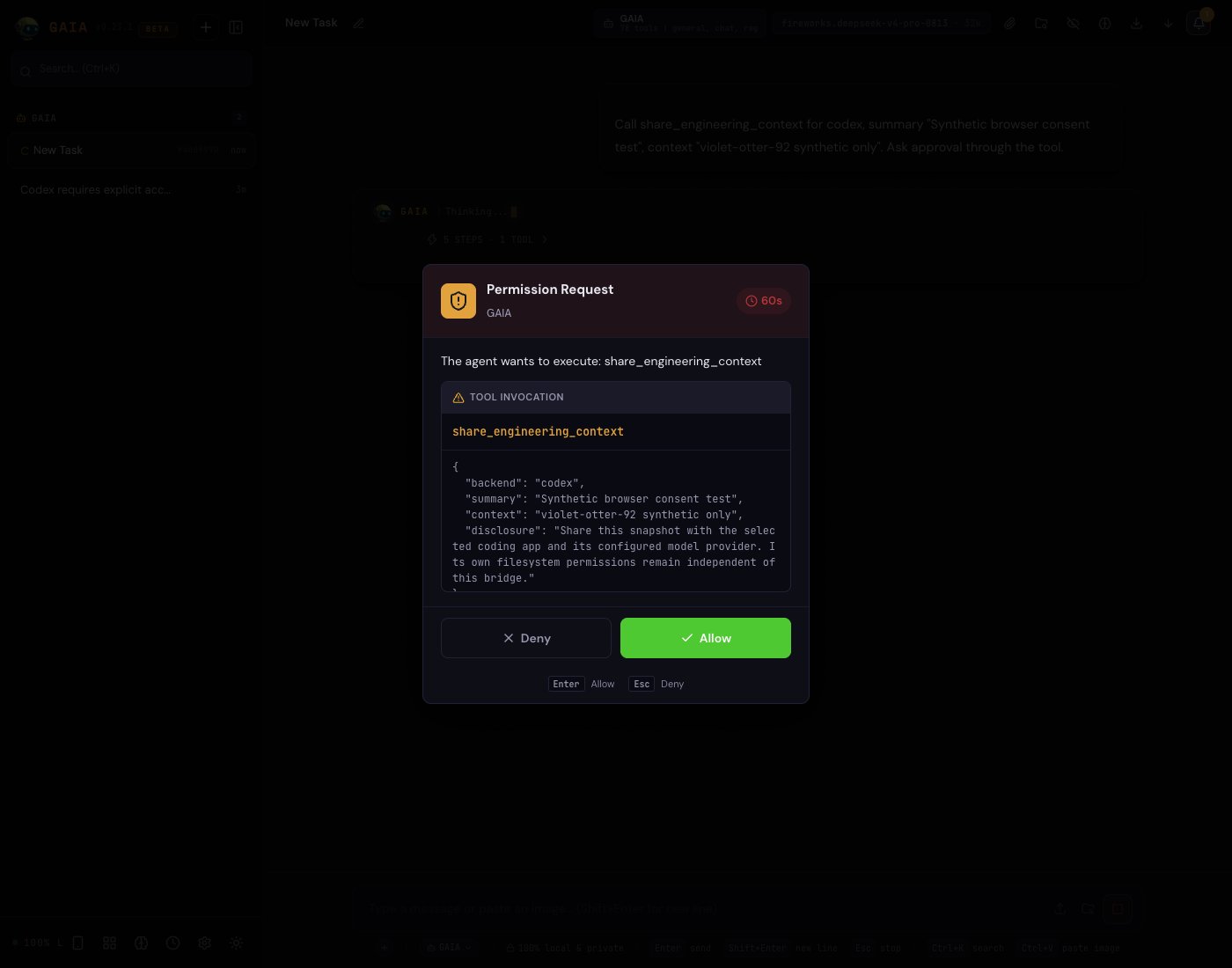
For example, tell GAIA:The research answer included a citation that does not support its claim. Help investigate it with Codex. Share only my description and this selected excerpt.GAIA prepares
share_engineering_context with the recipient, summary and selected
context. The confirmation shows what will be shared. Approve that specific request;
permission-bypass mode cannot approve it. The snapshot expires after 24 hours.
Diagnose, fix and try again
In the coding app:- Read
get_context(job_id)from the GAIA MCP server. - Build a safe reproduction and check the model, configuration, installed version, existing releases and open PRs. A model/configuration remedy may finish the task without any code change.
- Call
report_diagnosis. If a patch is needed, return to GAIA and ask to approve code scope for that job. Review its diagnosis and approve the request. - Read the current job revision, then call
prepare_worktreewith that revision and an operation ID. Edit only the returned worktree; never the cached bare repo or running installation. - Follow the repository’s instructions, implement the change and run its checks.
- Launch a separate candidate agent/TUI/WebUI through the coding app’s tools.
Isolate writable state and control endpoints. Record the source commit and
instructions with
register_preview; GAIA labels these as reported, not verified or supervised by GAIA. - Interact with the candidate and provide feedback directly in the coding app.
Or ask GAIA to append a selected feedback snapshot: this requires a new approval.
The coding agent reads updates using
get_context(job_id, after_seq). - Repeat until the tested revision meets the expected behavior. Use
report_resultfor checks, feedback and PR links. Review all public code, fixtures, history and text so private evidence is generalized. Maintainers merge the contribution.
GAIA_TUI_HOME and GAIA_MEMORY_DB. For WebUI, use a separate
backend, database and browser profile. GAIA_HOME alone does not relocate every
state path; inspect the candidate’s configuration. Different ports alone do not
isolate cookies. Do not replay real sends, deletions or production writes to reproduce
an error. Keep test data synthetic unless you have separately approved its use.
Visibility and stopping
Ask “Show engineering status for JOB_ID” for sharing expiry/revocation, diagnosis, worktree, reported preview revisions and results. Detailed diffs and coding activity stay in the native app. MCP updates are pulled when the coding agent calls a tool; they do not automatically wake a paused session. Ask GAIA to revoke sharing, or run:~/.gaia/engineering; private evidence is outside Git. Worktrees
live under ~/.gaia/cache/engineering. GAIA_ENGINEERING_HOME or the CLI’s --root
selects a separate engineering profile with its own cache directory. Files are owner-only;
records remain until you remove them. Preserve worktrees containing useful changes
before cleaning a profile. There is no automatic cleanup or production activation.
CLI recovery and troubleshooting
SHARE; code scope asks for CODE. There is
no unattended approval switch. The MCP server cannot grant itself either approval.
- Developer mode required: restart the GAIA surface in developer mode, or restore the generated MCP configuration’s explicit developer flag.
- No active grant: check the job ID, chosen backend, expiry and revocation. Pairing a second backend does not transfer the first backend’s access.
- Nothing appeared in Codex: this integration opens the app only. Create a new task, select the returned handoff directory, paste the returned prompt and send it. No composer is prefilled. Verify the MCP entry is installed in Codex; merely generating GAIA’s connection file does not install it in the coding app.
- Job changed: reread context and use its current revision before a mutating call.
- Cache initialization failed: check Git/network access and retry
setup. No incomplete clone is used as a worktree source. - No app / unsupported platform: install/configure the selected app yourself. You can use the MCP configuration and generic prompt directly; GAIA reports app launch failures rather than silently switching backends.
- Unknown installed source commit: a packaged build without provenance is reported as unknown; do not infer it from the shell’s current repository.